Water
General UI Overview
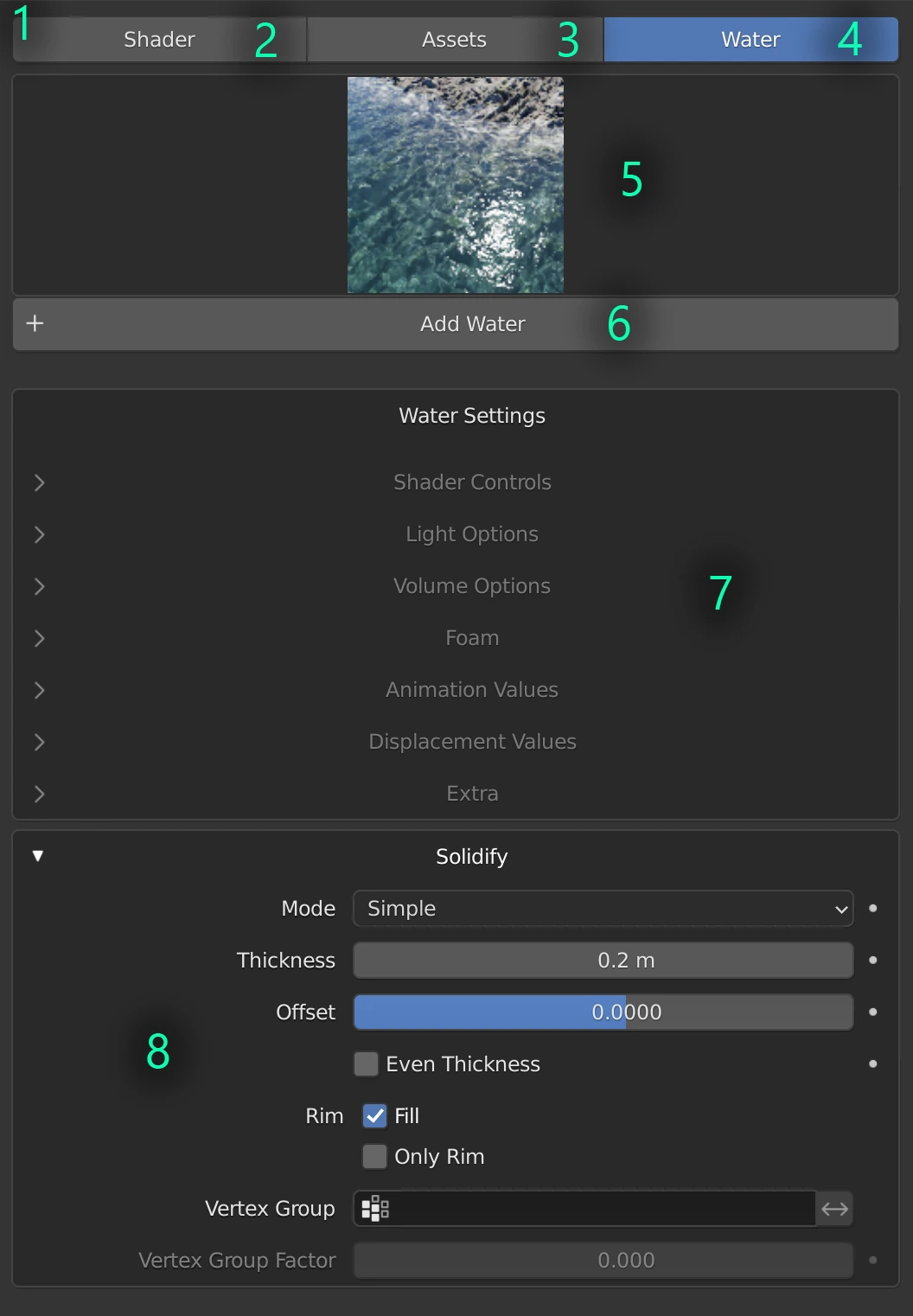
- UI Area Type: Changing this menu will change what is visible
- See Shader section
- See Assets section
- See Water section
- Water Type Icon Picker
- Add Water
- Current Water Settings. See Shader Settings
- Solidify Modifier settings.
Shader Settings
Shader Controls
Surface Colour
Changes the surface colour
IOR
Changes the index of refraction of the water shader. Water at its default is 1.330
Roughness
(0 to 1) The amount of roughness applied to the water shader
Dirty Water
(0 to 1) Changes the dirtiness of the water
Surface Dirt
(0 to 1) The amount of surface dirt applied to the water shader
Dirt Amount
The amount dirt applied to the water shader
Dirt Distortion
(0 to 1) The amount of distortion applied to the dirt
Light Options
Dispersion Amount
(0 to 1) The amount of dispersion applied to the water shader
Caustic Type
(0 to 1) The type of caustic applied to the water shader
Fake Caustic Amount
(0 to 1) The amount of fake caustic applied to the water shader
Caustic Strength
The strength of the caustic applied to the water shader
Volume Options
Density
Changes the density of the volume applied to the water shader
Deposit Offset
Changes the offset of the deposits in the water shader
Light Penetration
(0 to 1) The amount of light penetration applied to the water shader
Hue
Changes the Hue of the water shader
Saturation
Changes the saturation of the water shader
Lightness
Changes the lightness of the water shader
Foam
Foam On/Off
(0 to 1) Turns the foam effect on or off
Generated (slow) or Paint map
(0 to 1) Chooses between generated foam (slow) or paint map
High Calculations (SLOW)
(0 to 1) Enables high calculations for foam (slow)
Distance (Artistic)
(0 to 1) Adjusts the artistic distance of the foam
Visibility
Changes the visibility of the foam applied to the shader
Animation Values
Direction Map
(0 to 1) The direction map applied to the water shader
Arrow Size
The size of the arrow
Direction in Degrees
The direction of the animation in degrees
Ripple Animation Speed
The speed of the ripple animation applied to the water shader
Raindrop Animation Speed
The speed raindrop animation applied to the water shader
Foam Animation Speed
The speed of the foam animation applied to the water shader
Caustic Animation Speed
The speed of the caustic animation applied to the water shader
Direction Animation Speed
The speed of the direction animation applied to the water shader
Displacement Values
Micro-details
On (blue) Off (grey)
Micro-Detail Intensity
The intensity of the micro-details applied to the shader
Amount of Ripples
The amount of ripples applied to the shader
Ripple Intensity
The intensity of the ripples applied to the water shader
Rain
On (blue) Off (grey)
Rain Amount
The amount of rain generated
Rain Coverage
The amount of coverage applied to the rain
Rain Intensity
The intensity of the rain
Rain Foam Production
The amount of foam produced by rain
Overall Intensity
The overall intensity of displacement applied to the water
Extra
Object Midlevel
Neutral displacement value that causes no displacement. With the default 0.500 any lower values will cause the surfaces to be pushed inwards, and any higher values will push them outwards. Can go below 0 to offset higher displacement values
Object Displacement Scale
The scale of displacement applied to the object
Caustic Map
The caustic map applied to the water shader
Fast Water (not PBR)
Fast water option (not physically based rendering)