Shaders/Textures
Foreword
Info
TrueTERRAIN 4.0 offers 2 different types of Shader. Image based (Textures) and Procedural (Built inside Blender). Procedural textures can be subject to changes over time or not working due to Blender updates. If this happens, we will address this as soon as we can.
Warning
All the setting OPTIONS will stay the same across image based shaders. Procedural based shaders will have different setting values to allow for more control and possibilities. RESULTS WILL VARY
Image Texture Shader Settings
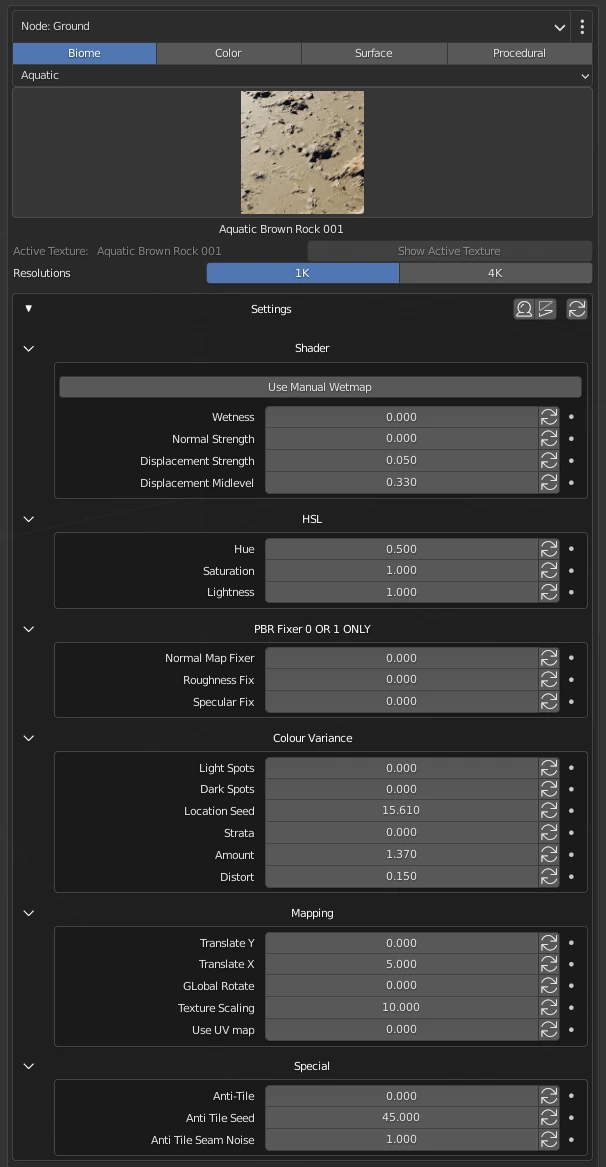
Shader
Wetness
(0 to 1) The amount of ‘wet’ effect that is applied to the shader
Normal Strength
The intensity of the normal map value
Displacement Strength
The intensity of the displacement
Displacement Midlevel
Neutral displacement value that causes no displacement. Lower values than the default (0.330) will cause the surfaces to be pushed inwards, and higher values will push them outwards. Can go below 0 to offset higher displacement values
PBR Fixer 0 OR 1 ONLY
Normal Map Fixer
Flips the Normal Map from Open GL to Direct X Vice Versa
Roughness Fix
Flips the black and white values (Roughness map to Glossy Map Vice Versa)
Specular Fix
Flips the Black and white Values (Specularity to Reflection Map or Vice versa)
Color Variance
Light Spots
(0-1) The amount of light spots applied to the shader
Dark Spots
(0-1) The amount of dark spots applied to the shader
Location Seed
Changes the location pattern of the seed
Strata
The amount of strata (layering) applied to the shader
Amount
The amount of spots applied to the shader
Distort
The amount of distortion applied to the shader
Mapping
Translate Y
Moves the image along the Y-axis (up/down)
Translate X
Moves the image along the X-axis (left/right)
Global Rotate
Rotates the image
Texture Scaling
Scales the size of the image texture
Use UV map
(0 to 1) Unwraps the 3D object and applies 2D texture
Special
Anti-Tile
(0 to 1) Applies anti-tiling pattern to texture
Anti-Tile Seed
Changes the pattern the noise will have
Anti-Tile Seam Noise
The amount of anti-tile seam noise applied to the shader
PBR Fixer Settings
PBR FIXER SETTINGS ONLY NEED TO BE USED WHEN IMPORTING YOUR OWN TEXTURES, THAT DO NOT NATIVELY WORK IN BLENDER. FOR EXMAPLE: MAYA TO BLENDER WILL REQUIRE ALL 3 SETTINGS ENABLED.
Procedural Texture Image Settings
Complete Desert 001
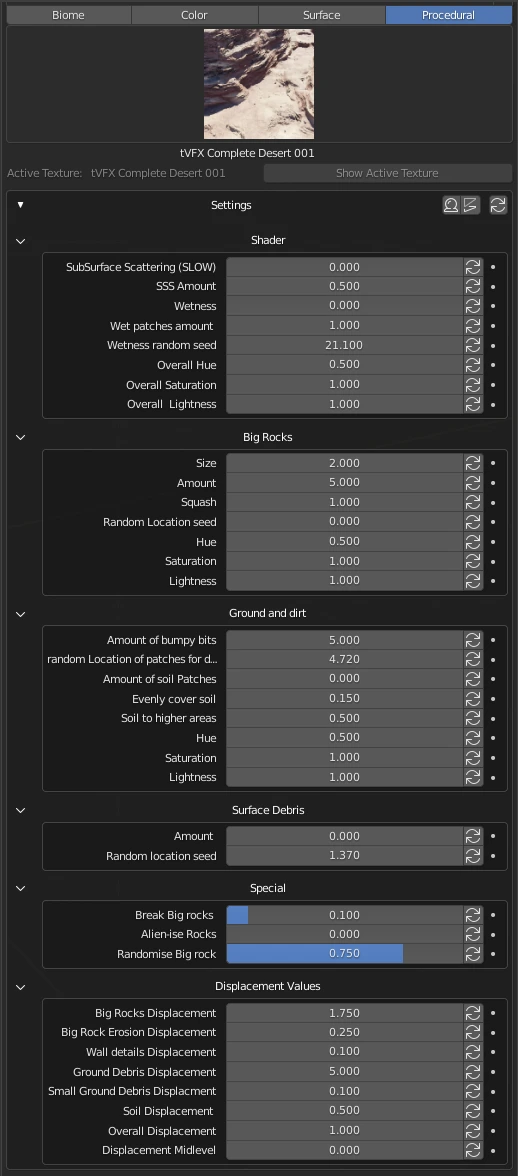
Shader
Subsurface Scattering (SLOW)
(0 to 1) The amount of Subsurface scattering applied to the shader.
Warning
May affect performance issues
SSS Amount
The amount of subsurface scattering applied to the shader
Wetness
The amount of wetness applied to the shader
Wet Patches Amount
The amount of wet patches applied to the shader
Wetness Random Seed
Randomises the wetness seed
Overall Hue
Changes the overall hue of the shader
Overall Saturation
Changes the overall saturation of the shader
Overall Lightness
Changes the overall lightness of the shader
Big Rocks
Size
Changes the size of the big rocks on the texture
Amount
Changes the amount of big rocks on the texture
Squash
Squashes the big rocks on the texture
Random
ocation Seed: Randomizes the pattern of the big rocks on the texture
Hue
Changes the hue of the big rocks
Saturation
Changes the saturation of the big rocks
Lightness
Changes the lightness of the big rocks
Ground and Dirt
Amount of bumpy bits
Changes the amount of bumpy bits on the ground and dirt
Random Location of patches for dirt
Randomizes the location of the patches of dirt on the texture
Amount of soil patches
The amount of soil patches on the texture
Evenly Cover Soil
Changes the soil on the texture evenly
Soil to Higher Areas
The amount of soil applied on higher areas of the texture
Hue
Changes the hue of the ground and dirt
Saturation
Changes the saturation of the ground and dirt
Lightness
Changes the lightness of the ground and dirt
Surface Debris
Amount
The amount of surface debris applied to the texture
Random Location of seed
Changes the pattern the noise will have
Special
Break Big Rocks
(0 to 1) The amount of breakage applied to the big rocks on the texture
Alien-ise Rocks
(0 to 1) Makes the rocks look like alien rocks on the texture (artistic value)
Randomize Big Rocks
(0 to 1) The amount of randomization applied to the big rocks on the texture
Displacement Values
Big Rocks Displacement
The amount of displacement applied to the big rocks on the texture
Big Rock Erosion Displacement
The amount of erosion displacement applied to the big rocks on the texture
Wall Details Displacement
The amount of wall details displacement applied to the shader
Ground Debris Displacement
The amount of ground debris displacement applied to the shader
Small Ground Debris Displacement
The amount of small ground debris displacement applied to the shader
Overall Displacement
The amount of overall displacement applied to the shader
Displacement Midlevel
Neutral displacement value that causes no displacement. With the default 0.00, lower values will cause the surfaces to be pushed inwards, and any higher values will push them outwards. Can go below 0 to offset higher displacement values
Ground Desert 001
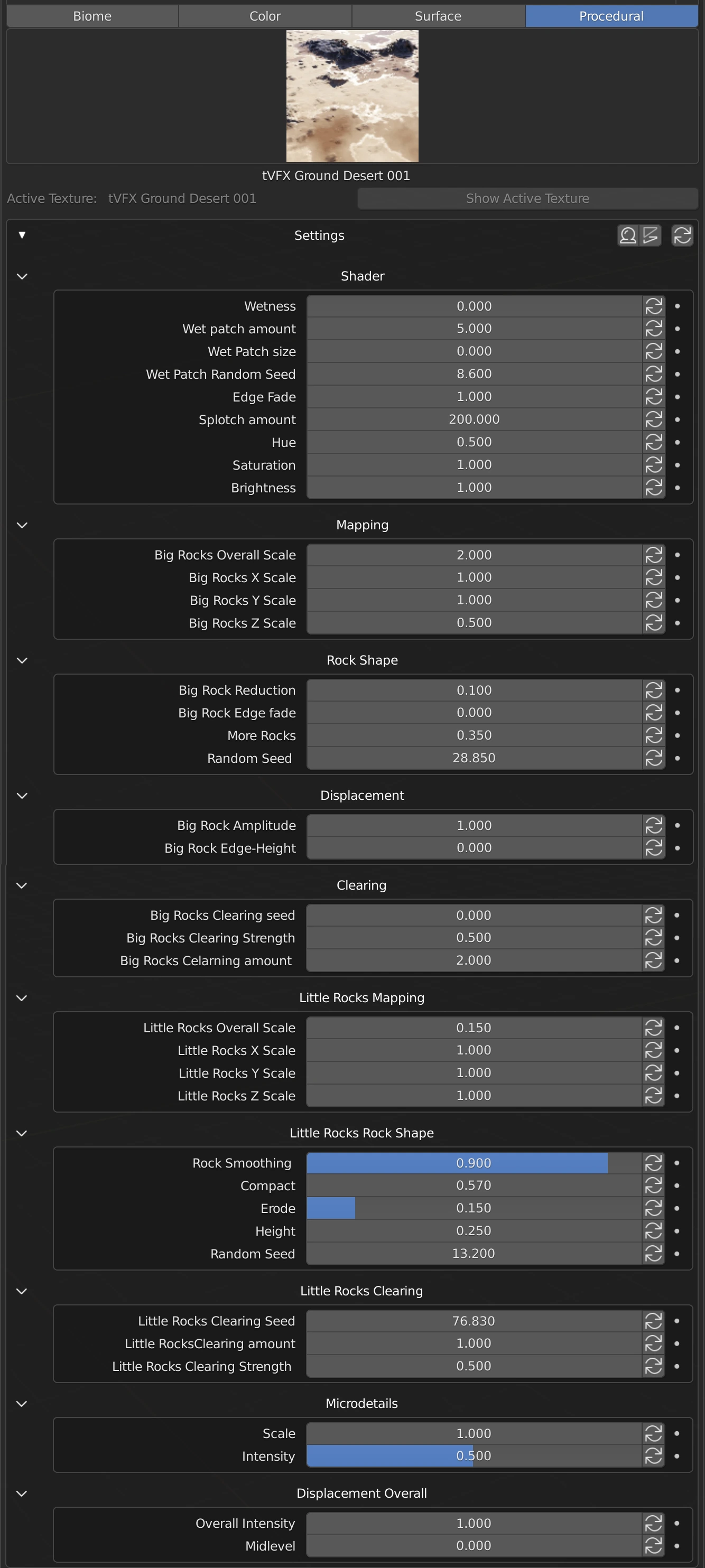
Shader
Wetness
(0 to 1) The amount of ‘wet’ effect that is applied to the shader
Wet Patch Amount
The amount of wet patches applied to the shader
Wet Patch Random Seed
Randomizes the wet patch seed
Wet Patch Random Amount
Randomizes the amount of wet patches applied to the shader
Edge Fade
Changes the amount of edge fade applied to the shader
Splotch Amount
The amount/thickness of splotching applied to outside of the ‘wet’ patches
Hue
Changes the hue of the shader
Saturation
Changes the saturation of the shader
Brightness
Changes the brightness of the shader
Mapping
Overall Scale
Changes the overall scale of the big rocks
X Scale
Changes the scale on the X-axis of the big rocks
Y Scale
Changes the scale on the Y-axis of the big rocks
Z Scale
Changes the scale on the Z-axis of the big rocks
Rock Shape
Big Rock Reduction
Reduces the number of big rocks on the texture
Big Rock Edge Fade
The amount of edge fade applied to the big rocks
More Rocks
Adds more big rocks to the texture
Random Seed
Randomizes the seed of the big rocks
Displacement
Big Rock Amplitude
The amount of amplitude applied to the big rocks
Big Rock Edge Height
Changes the height of the edges of the big rocks
Clearing
Clearing Seed
Randomizes the clearing seed of the big rocks
Clearing Strength
The strength of clearing applied to between the big rocks
Clearing Amount
The amount of clearing applied to the big rocks
Little Rocks Mapping
Overall Scale
Changes the overall scale of the little rocks
X Scale
Changes the scale on the X-axis of the little rocks
Y Scale
Changes the scale on the Y-axis of the little rocks
Z Scale
Changes the scale on the Z-axis of the little rocks
Little Rocks Rock Shape
Rock Smoothing
(0 to 1) The amount of smoothing applied to the little rocks
Compact
Changes the overall compactness of the little rocks
Erode
(0 to 1) The amount of erosion applied to the little rocks
Height
Changes the height of the little rocks
Random Seed
Randomizes the seed of the little rocks
Little Rocks Clearing
Clearing Seed
Randomizes the clearing seed of the little rocks
Clearing Strength
The strength of clearing applied to between the little rocks
Clearing Amount
The amount of clearing applied to the little rocks
Microdetails
Scale
Changes the scale applied to micro details on the texture
Intensity
(0 to 1) Changes the intensity of the micro details on the texture
Displacement Overall
Intensity
(0 to 1) The intensity of the overall displacement of the texture
Midlevel
Neutral displacement value that causes no displacement. With the default 0.0, any lower values will cause the surfaces to be pushed inwards, and any higher values will push them outwards. Can go below 0 to offset higher displacement values
Rock Desert 001
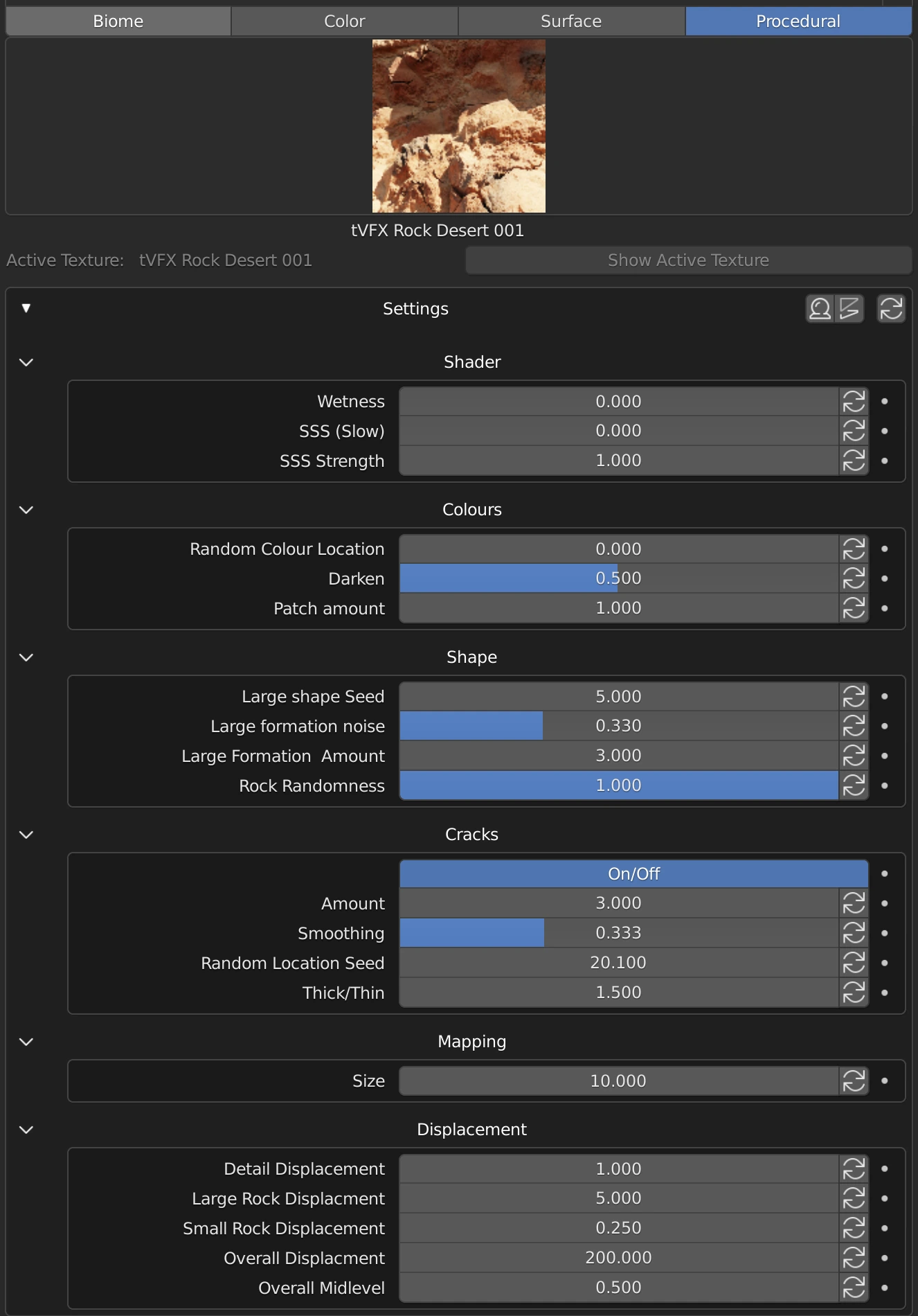
Shader
Wetness
(0 to 1) The amount of ‘wet’ effect that is applied to the shader
SSS (Slow)
The amount of subsurface scattering applied to the shader. WARNING: may affect performance issues
SSS Strength
The strength of subsurface scattering applied to the shader
Colours
Random Colour Location
Randomizes the colour location of the shader
Darken
(0 to 1) Changes the amount of darkness applied to the shader
Patch Amount
The amount of colour patches applied to the shader
Shape
Large Shape Seed
Randomizes the large shape seed of the texture
Large Formation Noise
(0 to 1) The amount of large formation noise applied to the shader
Large Formation Amount
The amount of large formations applied to the texture
Rock Randomness
(0 to1) Randomises the rocks applied to the texture
Cracks
On/Off
Apply cracks to the texture or turn cracks off
Amount
The amount of cracks applied to the shader
Smoothing
(0 to 1) The amount of smoothing applied to the cracks
Random Location Seed
Randomises the seed of the cracks applied to the texture
Thick/Thin
The amount of thickness applied to the cracks on the texture
Mapping
Size
Changes the size of the texture map
Displacement
Detail Displacement
The amount of displacement applied to the detail on the texture
Large Rock Displacement
The amount of displacement applied to the large rocks on the texture
Small Rock Displacement
The amount of displacement applied to the small rocks on the texture
Overall Displacement
The amount of overall displacement applied to the texture
Overall Midlevel
Neutral displacement value that causes no displacement. With the default 0.5, any lower values will cause the surfaces to be pushed inwards, and any higher values will push them outwards. Can go below 0 to offset higher displacement values